Product Structured Data: Pricing, Inventory, Ratings & JSON-LD Examples
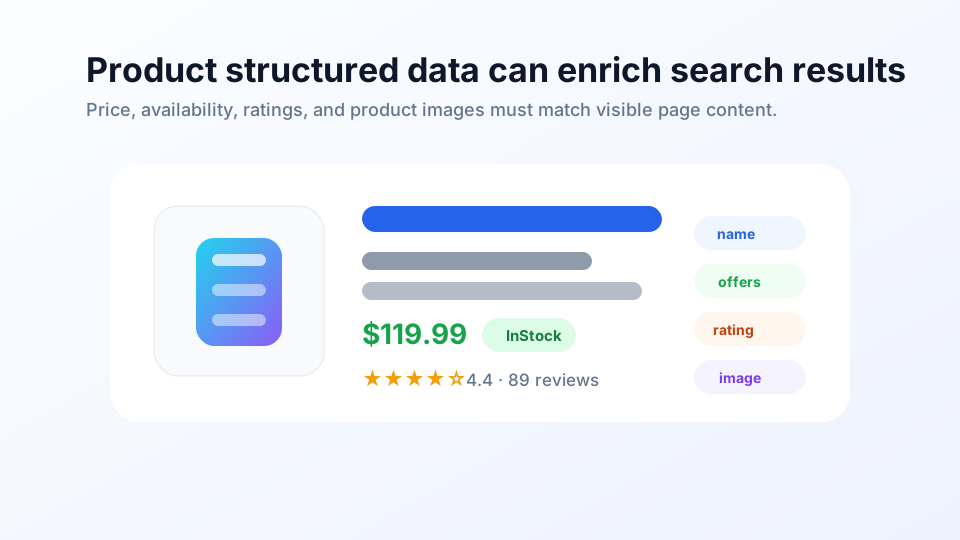
Product is one of the most critical structured data types for e-commerce SEO. It enables Google to better understand product names, images, prices, inventory, ratings, shipping, and return information, potentially displaying richer product information in search results, Google Images, Google Lens, and shopping-related experiences. However, Product is also the type most prone to violations: prices, inventory, and ratings must be authentic, visible, and up-to-date.
First, Understand Two Types of Product Results#
Google now categorizes product structured data into two usage scenarios:
| Type | Best For | Key Information |
|---|---|---|
| Product snippets | Product introductions, reviews, comparisons, not necessarily purchasable | Product name, ratings, reviews, price, inventory |
| Merchant listings | E-commerce product pages where users can purchase directly | Product images, price, inventory, shipping, returns, variants, merchant policies |
If your page is a "Top 10 Air Purifier Reviews," it leans toward Product snippet. If the page has add-to-cart, inventory, pricing, and checkout flow, it leans toward Merchant listing. The two overlap, but don't use a simple template to blindly cover all scenarios.
How to Fill Core Fields#
Product snippet requires at least product name, plus one of review, aggregateRating, or offers. Merchant listing has higher requirements for purchasable product pages, typically requiring image and complete Offer information.
| Field | Purpose | Notes |
|---|---|---|
name | Product name | Consistent with page product title |
image | Product image | Real product photo, crawlable, preferably white background or clear product display |
description | Product description | Consistent with visible selling points on page, no keyword stuffing |
sku / mpn / gtin | Product identifiers | Helps Google identify specific products |
brand | Brand | Use Brand object, name must be authentic and visible |
offers | Price and inventory | Most critical for e-commerce, must update promptly |
aggregateRating | Aggregate rating | Only fill when real reviews exist |
review | Individual review | Review content and author should be visible and authentic |
JSON-LD Example for Purchasable Product Page#
Below is a basic example for an e-commerce product page. In practice, all fields must come from page-visible content or real product data sources.
<script type="application/ld+json">
{
  "@context": "https://schema.org/",
  "@type": "Product",
  "name": "Executive Anvil",
  "image": [
    "https://example.com/photos/anvil-1x1.webp",
    "https://example.com/photos/anvil-4x3.webp",
    "https://example.com/photos/anvil-16x9.webp"
  ],
  "description": "A compact steel anvil for workshop demonstrations.",
  "sku": "ANVIL-001",
  "brand": {
    "@type": "Brand",
    "name": "ACME"
  },
  "offers": {
    "@type": "Offer",
    "url": "https://example.com/products/executive-anvil",
    "priceCurrency": "USD",
    "price": 119.99,
    "priceValidUntil": "2026-12-31",
    "availability": "https://schema.org/InStock",
    "itemCondition": "https://schema.org/NewCondition"
  },
  "aggregateRating": {
    "@type": "AggregateRating",
    "ratingValue": 4.4,
    "reviewCount": 89
  }
}
</script>
Offer: Price and Inventory Are High-Risk Fields#
offers is the most critical and error-prone part of Product. Once price and inventory are inconsistent with the page, checkout, or Merchant Center Feed, trust is damaged.
priceuses current effective price, numbers with decimal points, no currency symbol.priceCurrencyuses three-digit ISO 4217 currency code, likeUSD,CNY,EUR.availabilityuses schema.org enumeration URL, likehttps://schema.org/InStock.priceValidUntilis only filled when price has an expiration, must update before expiry.- When products are delisted, out of stock, or price changes, page, structured data, and Feed must sync.
Don't Fake Ratings and Reviews#
Star ratings are attractive for click-through rates, making this a high-violation area. Only fill aggregateRating or review when these conditions are met:
- Ratings come from real users or authentic editorial reviews;
- Ratings, review counts, or specific reviews are visible on the page;
- Review subject is the current product, not the entire brand or other products;
- Merchants cannot fabricate ratings for their own products;
- When review counts or scores change, structured data must sync.
If there are no reviews, don't write rating fields. Product without stars can still be compliant; fabricating ratings is more dangerous.
Structured Data and Merchant Center#
Google explicitly recommends: e-commerce websites can use both on-page Product structured data and Google Merchant Center product feeds. They are not mutually exclusive.
| Method | Advantages | Suitable Data |
|---|---|---|
| On-page structured data | Close to page, Google can read by crawling | Product name, page images, prices, inventory, ratings |
| Merchant Center Feed | Suitable for scale and high-frequency updates | Inventory, prices, shipping, returns, product variants, promotions |
Ideally, data on both sides should be consistent. If the page says in stock but Feed says out of stock, or page price differs from Feed price, Google needs to judge who's credible and may reduce eligibility for related experiences.
Why This Site Doesn't Implement Product Markup#
This article discusses Product, but the page itself is not a product page, nor does it have prices, inventory, purchase buttons, real product images, or user reviews. Therefore, this page will not add Product JSON-LD just to "practice what we preach."
How to Validate and Monitor#
- Test product pages with Rich Results Test.
- Check for errors and warnings in Product snippets and Merchant listings.
- Spot-check whether prices, inventory, and ratings match page-visible content.
- After launch, monitor batch errors in Search Console shopping-related enhancement reports.
- If using Merchant Center, simultaneously check product diagnostics, price inconsistencies, inventory inconsistencies, etc.
Common Mistakes#
| Error | Consequence | Fix |
|---|---|---|
| Marking tutorial page as Product | Type mismatch | Only real product pages use Product |
| Price inconsistent with page | Untrustworthy, may affect shopping eligibility | Generate page and JSON-LD from same data source |
| Expired inventory | Poor UX, data distortion | Update promptly when out of stock or delisted |
| Fabricated aggregateRating | High risk of structured data violation | Don't write ratings without real reviews |
| Image not product photo | Google struggles to display product | Use clear, crawlable, real product images |
| Ignoring Merchant Center | Incomplete e-commerce data | Use structured data and Feed together |
Product Launch Checklist#
- Page is real product page, product review, or product introduction page
- Distinguish Product snippets from Merchant listings scenarios
- name consistent with page product title
- image is real, visible, crawlable product photo
- offers.price consistent with current page price
- priceCurrency uses three-digit currency code
- availability consistent with real inventory
- aggregateRating/review from real visible reviews
- Product identifiers sku/mpn/gtin completed as much as possible
- Page data, JSON-LD, Merchant Center Feed remain consistent
- Rich Results Test shows no critical errors
- Continuous monitoring in Search Console and Merchant Center
Frequently Asked Questions#
What is the difference between Product snippets and Merchant listings?
Product snippets are suitable for product introduction, review, or comparison pages that cannot be directly purchased, focusing on ratings, reviews, prices, and other summary information. Merchant listings are suitable for e-commerce product pages where users can purchase directly, focusing on prices, inventory, shipping, returns, product images, and more complete merchant information. The two overlap, but key fields should be selected based on whether the page can be purchased directly.
Is adding Product structured data sufficient for product pages?
Not necessarily. For e-commerce websites, Google recommends providing both on-page Product structured data and Google Merchant Center product feeds. The combination improves data completeness and consistency, and is better suited for frequently changing information like inventory, prices, shipping, and returns.
Can I mark prices or ratings that are not displayed on the page?
No. Price, inventory, ratings, reviews, and other information in Product structured data must be consistent with content visible to users on the page. Fabricated ratings, hidden prices, expired inventory, or Offers inconsistent with the page may cause rich results to fail or even trigger structured data violations.
Can I write aggregateRating when there are no user reviews?
You should not. aggregateRating must come from real, visible, verifiable review data. If a product has no real reviews, do not fabricate ratings for star display. You can first provide only real fields like name, image, and offers.