BreadcrumbList Structured Data: JSON-LD Examples and Guidelines
Breadcrumb is one of the most valuable structured data types to implement first. It improves both user experience and helps search engines understand page position in site hierarchy. The key to BreadcrumbList is not complex fields—it's about "real paths, correct order, visible content consistency." This article explains fields, examples, multiple trail scenarios, and common mistakes using JSON-LD.
What is BreadcrumbList#
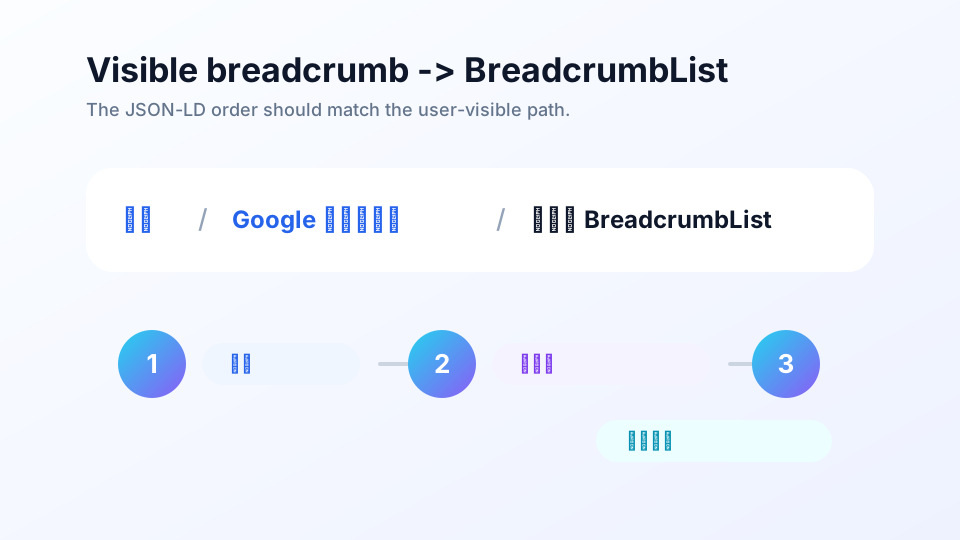
Breadcrumb is a trail from higher-level pages to the current page, for example:
Home / Google Structured Data / BreadcrumbListBreadcrumbList describes the same path using structured data. Google's official documentation requires BreadcrumbList to contain at least two ListItem elements, expressing order through position.
Why It Matters#
- Help users orient: Users quickly know their location in site structure and can return to parent categories.
- Help Google understand hierarchy: Makes relationships between pages, categories, and homepage clearer.
- Improve search result trails: Google may replace long URLs with friendlier breadcrumb trails in search results.
- Aid internal linking: Each article linking up to category pages benefits category aggregation and topic clusters.
<head>. The path users see matches what Google reads.Required Properties#
BreadcrumbList has few fields, but order and consistency are critical.
| Level | Property | Purpose | Recommendation |
|---|---|---|---|
BreadcrumbList | itemListElement | Array containing all breadcrumb nodes | Order from parent to current page |
ListItem | position | Node's sequence number in path | Start from 1, increment continuously |
ListItem | name | Node name | Match visible text on page |
ListItem | item | Node's corresponding URL | Use absolute URL, point to canonical page |
Google's examples sometimes omit item for the final level, showing only name and position. In practice, I recommend including the current page's canonical URL as item for the final level to maintain consistency with the page's canonical address.
Complete JSON-LD Example#
<script type="application/ld+json">
{
  "@context": "https://schema.org",
  "@type": "BreadcrumbList",
  "itemListElement": [
    {
      "@type": "ListItem",
      "position": 1,
      "name": "Home",
      "item": "https://example.com/"
    },
    {
      "@type": "ListItem",
      "position": 2,
      "name": "Technical SEO",
      "item": "https://example.com/articles/technical-seo/"
    },
    {
      "@type": "ListItem",
      "position": 3,
      "name": "Site Speed Optimization",
      "item": "https://example.com/articles/technical-seo/site-speed.html"
    }
  ]
}
</script>
Must Match Visible Breadcrumbs#
BreadcrumbList is a machine translation of the page's visible path—not a separate hidden trail just for search engines. Verify three things:
- Node count matches: If page shows 3 levels, JSON-LD should also have 3 ListItem elements.
- Node names match: If visible text is "Google Structured Data," don't write "Schema Tutorial" in JSON-LD.
- URLs match: Visible links, JSON-LD
item, and corresponding page canonical should use the same canonical URLs.
Multiple Breadcrumb Trails#
Some pages can genuinely be accessed via multiple paths. For example, an award-winning sci-fi novel might belong under both "Books / Sci-Fi / Award Winners" and "Literature / Award Winners." Google supports marking multiple BreadcrumbList trails for the same page.
[
  {
    "@context": "https://schema.org",
    "@type": "BreadcrumbList",
    "itemListElement": [
      { "@type": "ListItem", "position": 1, "name": "Books", "item": "https://example.com/books" },
      { "@type": "ListItem", "position": 2, "name": "Sci-Fi", "item": "https://example.com/books/scifi" },
      { "@type": "ListItem", "position": 3, "name": "Award Winners", "item": "https://example.com/books/scifi/awards" }
    ]
  },
  {
    "@context": "https://schema.org",
    "@type": "BreadcrumbList",
    "itemListElement": [
      { "@type": "ListItem", "position": 1, "name": "Literature", "item": "https://example.com/literature" },
      { "@type": "ListItem", "position": 2, "name": "Award Winners", "item": "https://example.com/books/scifi/awards" }
    ]
  }
]
But for most content sites, a single primary path suffices. Multiple trails only make sense when users can genuinely reach the page through multiple real category paths.
URL & Canonical Rules#
- Use absolute URLs, not relative paths.
- Prefer canonical URLs; avoid sometimes using trailing slash, sometimes not.
- Parent pages in breadcrumbs should return 200 and be indexable, important pages.
- Don't include parameter URLs, tracking URLs, or redirect URLs in
item.
If the category page is https://example.com/articles/google-structured-data/, don't write it as https://example.com/articles/google-structured-data/index.html in another article. Internal links, canonical, and structured data should be consistent.
How This Page Demonstrates#
The visible breadcrumb at the top of this page is:
Home / Google Structured Data / BreadcrumbListThe BreadcrumbList in this page's JSON-LD contains exactly those three nodes, and the third node's item points to this page's canonical URL. This is the minimal closed loop of "visible content consistency."
How to Validate#
- Test the page with Rich Results Test.
- Confirm BreadcrumbList is detected.
- Check that each ListItem's
positionincrements continuously. - Check that
namematches visible breadcrumb text on the page. - After launch, monitor the "Breadcrumb" report in Search Console Rich Results Reports for errors.
Common Mistakes#
| Error | Manifestation | Fix |
|---|---|---|
| position gaps | 1, 2, 4 or duplicate 2 | Start from 1, increment continuously |
| Reversed path order | Current page first, homepage last | Write from highest level to current page |
| Visible path and JSON-LD mismatch | Page shows A, markup says B | Generate both synchronously or verify manually |
| Relative URLs | "/articles/..." | Use absolute URLs in structured data |
| Parent page inaccessible | Category page 404, noindex, redirect chain | Ensure parent pages stably return 200 |
| Fabricated multiple trails | JSON-LD contains categories users don't see | Only mark real navigation paths |
BreadcrumbList Launch Checklist#
- Page has user-visible HTML breadcrumbs
- JSON-LD uses BreadcrumbList
- itemListElement contains at least two ListItem elements
- position starts from 1 and increments continuously
- name matches visible breadcrumb text
- item uses absolute URLs
- item points to canonical URLs, avoiding parameters and redirects
- Final level matches current page canonical
- Multiple trails only used for genuine visible navigation paths
- Rich Results Test shows no errors
- Search Console breadcrumb report shows no batch issues
Frequently Asked Questions#
Must breadcrumb structured data match visible breadcrumbs on the page?
Yes, it should. The purpose of BreadcrumbList is to translate the actual hierarchical path on the page into machine-readable format. If the path marked in JSON-LD differs from what users see, it creates inconsistent signals and may violate the principle that structured data should match visible content.
Should I include an item for the final current page?
Google's examples sometimes show only name and position for the final level, but can also include item. For clearer canonical signals, MagicSEO's practice is to include the current page's canonical URL as item for the final level, ensuring consistency with visible breadcrumbs and canonical.
Can a page have multiple BreadcrumbList trails?
Yes. If your site genuinely has multiple user-visible and reasonable navigation paths to the same page, Google supports marking multiple breadcrumb trails. But don't fabricate paths for keyword coverage; multiple trails should come from real site structure.
Can breadcrumbs replace navigation and internal links?
No. Breadcrumbs complement hierarchical navigation and structured data; they cannot replace main navigation, category pages, and in-content links. A safer SEO approach is: have real clickable HTML breadcrumbs on the page, while using BreadcrumbList to describe the same path.